Your ads show up on random apps and websites. Someone taps your ad by accident while playing a game. You just paid for that click.
Got Questions: Call (561) 956-5201Email robert@clicktoacquire.com
For Small Business That Want Customers From Google Ads
“Discover How Growth-Hungry Business Owners Are Launching Effective Google Ads Without Paying $2,000/mo To Marketing Agencies Or Overseas Scammers”
Prepared By A Professional Who's Profitably Managed Over $4,000,000 in the past 9 years for hundreds of businesses.
◆ Click to turn on sound
10 Clicks From You (or Your Staff) = 80% Of Work Done + 20% from 1 Video (14 minutes)
Proof it Works (more below)
This is why most small businesses' Google Ads don't work and lose money.
It's usually not your business or your budget. It's the settings Google turns on for you.
Google's default setup is built to spend your money. Not protect it.
Your ads show to people who live hours away. Google's default location setting reaches way past your actual service area.
You pay for searches like "free," "jobs," and "DIY." Nobody searching those is going to hire you. But you're paying for them.
Everyone sees the same generic ad. Someone looking for one specific service sees a vague ad. Fewer clicks. Higher cost.
Google doesn't know which clicks turned into calls. So it goes after the cheapest clicks instead of the ones that become customers.
Put those together and you get the story we hear all the time:
"I tried Google Ads. Spent a few thousand bucks. Got nothing."
The ads weren't the problem. The setup was.
Then a Google Ads Rep Calls You

A few days after you open your account, a Google rep calls. Friendly. Helpful. Offers to fix your campaign for free.
Here's the thing: that rep gets measured on how much you spend. Not on how many customers you get.
What they usually push:
"Raise your daily budget." Before you know if it's even working.
"Use broad match - you're missing out." Missing out on what? More clicks isn't more customers.
"Turn on auto-apply." This lets Google change your campaign without asking. You find out after the money's gone.
"Try Performance Max." It hides where your money goes. And it needs data your new account doesn't have yet.
"Expand your targeting." More clicks from people who can't even use your service.
It's not a scam. It's just incentives. The rep works for Google.
The businesses that win on Google Ads decide what to run - then stick to it when the phone rings.
Here's how we fix it
We build your campaign for you - every setting already handled. All you do is drop it in and launch.
- You fill out a short formYour services, where you work, your website, and phone number. About 10 minutes.
- We build your campaignKeywords, ad groups, ads, negative keywords, and settings - built from your answers. Delivery target: 48 hours after you confirm your business details.
- You drop it into your accountWe send you a file. You open Google Ads Editor (a free program from Google), load the file, and your whole campaign appears. About 10 clicks. That's 80% of the work done.
- You watch one 14-minute videoWalks you through your budget, tracking, and a quick checklist before you turn it on. That's the other 20%.
- You launchWith the same setup we build for clients who pay us every month.
Proof it Works:
Disclaimer: These are real screenshots of clients I've personally managed and results I've gotten for them using this exact framework I am sharing with you.
Car Shop 1: (Texas)

Car Shop 2: (Florida)

Private Jet Charter
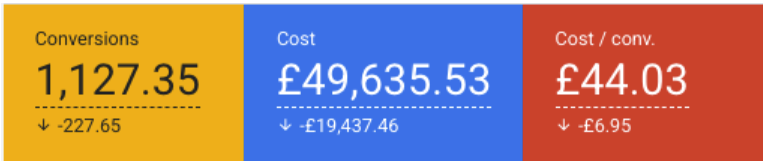
Dog Training (Florida)

Mobility Business

High End Bridal Store in Europe (Low competition, Cheap Clicks)


Who's behind this
Robert Sahakyan
Click To Acquire · Google Ads certified
- $4,000,000+ in Google and Meta ad spend managed
- 9 years running ads for hundreds of businesses
- Auto repair, dental, home services and more
"Your campaign gets the same setup I build for clients who pay me every month."
This is not for everybody.
This is for you if
- You serve a local area and want calls, not clicks - auto repair, plumbing, HVAC, dental, legal, home services and the like
- You spend under $3,000 a month on Google Ads, or you're about to start
- You've already paid Google or an agency "tuition" once, and you're done paying it
- You'd rather own your campaign than rent it by the month
- You have a website and someone to answer the phone
This isn't for you if
- You want a guaranteed number of leads. Nobody honest can promise that.
- You don't have a website yet. You'll be offered a Landing Page Kit after checkout.
- You want to hand everything off. That's our Managed service, $1,500/month.
- You're in a category Google restricts - med-spa and injectables, rehab, alcohol - or in life or health insurance, where clicks cost too much for a small budget.
Compare packages
Baby covers one corner. Ultimate covers the whole box.
Show up for more of the jobs people search for
Baby
Campaign
Shows up for
brake repair near meoil change
- 1 campaign
- Up to 5 ad groups
- Up to 50 keywords
Ultimate
Campaign
Also shows up for
transmission repair[your garage name][competitor] garagemechanic in [next town]
Not in Baby
Up to5campaigns5×Baby: 1
Up to20ad groups4×Baby: 5
Up to200keywords4×Baby: 50
Per ad group2ads2×Baby: 1
Up to 20 calloutsSitelinks per ad group
Custom negativesStructured snippets
Example searches for a car repair garage. Yours come from your services.
ManagedThis whole box, run for you every month
Baby
Campaign
Campaign
Ultimate
CampaignRecommended
CampaignRecommended
Managed
Package
Package
$350 one time
$349 more gets you up to 4 more campaigns, 4× the keywords and 7 tools.
Here's what Baby Campaign includes:
▾
- ✓ Custom campaign file (Google Ads Editor-ready)A ready-to-import file containing your complete Google Ads campaign structure.
- ✓ 1 basic services campaignOne focused campaign for your main services.
- ✓ Up to 5 ad groupsSomeone searching for brake repair sees an ad about brake repair.
- ✓ 1 responsive search ad per ad groupHeadlines and descriptions written for each ad group.
- ✓ Up to 50 keywordsHelps reach people searching for the work you want.
- ✓ Negative keywords: blocks money-wasting searches in your tradeHelps avoid paying for searches that are not a fit for your business.
- ✓ Starting bidding and conversion strategySets how Google uses your budget and which enquiries it should focus on.
- ✓ 3 calloutsMakes selling points such as emergency service or a workmanship warranty easier to spot.
- ✓ Call assetLets people call directly from your ad.
- ✓ Conversion tracking template (Tag Manager .json)A ready-made Tag Manager container. Import it, add your Google Ads conversion ID, publish.
- ✓ Tracking guide: Tag Manager, Analytics, CallRailShows how to measure calls and forms.
- ✓ Import, launch & handover checklistShows how to load your campaign, check the setup, and get ready to launch.
- ✓ Get $500+ From Google - NEW Accounts**Eligible NEW Google Ads accounts only. The amount depends on your ad spend in your first 60 days. Google issues the credit, usually within 35 days, and Google's terms apply. Ad credit, not cash.
Get ChatGPT Ads Done Also! - $199
▾
✓
A complete ChatGPT / AI search ads campaign built alongside your Google Ads - so you show up when people search with AI assistants too.
Get Landing Page Kit + Prompt! - $99
▾
✓
An AI-generated landing page wireframe + prompts you can use with tools like Lovable, Base44, or any page builder - designed to convert Google Ads traffic into leads.
Get Brand Kit Package - $27
▾
✓
We analyze your website and generate a complete brand identity kit: logo extracted, brand colors, fonts, and visual guidelines - packaged into 3–4 ready-to-use files.
INCLUDED IN EVERY PACKAGE
Know which ads make your phone ring
Google has to know when a click turns into a call or a form. Without that, it guesses, and it guesses cheap clicks. We build the tracking for you, so Google learns what a real customer looks like.
- 1Upload our file to Google Tag Manager (free)
- 2Copy one number from your Google Ads account into it
- 3Press Publish
Your launch video shows every click. Stuck? Email us and we'll help.
Baby + UltimateManaged: we set it all upHow much more Ultimate builds
Lime = Baby Campaign. Dark = what Ultimate adds.
Switch packages and see what changes
7 bonus tools only in Ultimate
Separate from the campaign. Yours to keep.
Bonus#1
Competitor Research Report
Shows what competitors promise and where your offer can stand out.
Not in Baby CampaignBonus#2
20-Minute Weekly Checklist
Gives you a simple routine for checking spending, wasted clicks, and results.
Managed: We do itNot in Baby CampaignBonus#3
Budget Pacer
Shows how fast you are spending and how much money is left.
Managed: We manage itNot in Baby CampaignBonus#4
Heat-Mapping Guide
Helps you see where people click or get stuck on your website.
Managed: We review itNot in Baby CampaignBonus#5
Reporting Prompt
Helps turn account numbers into a plain-English report.
Managed: Monthly reportNot in Baby CampaignBonus#6
AI Prompt Pack
Helps you find useful questions and possible improvements in your account data.
Managed: Done for youNot in Baby CampaignBonus#7
UTM Tracking Links
Helps identify which campaigns brought visitors and enquiries.
Not in Baby Campaign
Baby Campaign skips all 7. Get them with Ultimate for $349 more.
Upgraded in Ultimate
What gets better when you move up to Ultimate.
Ads per ad group1 RSA→2 RSAsTwo research-backed ads to test against each other.
Negative keywordsFor your trade→CustomBlocks searches that waste money, like "jobs" or "DIY". Baby uses a list built for your trade. Ultimate's list is built for your business, plus competitor searches.
SitelinksShared→Per ad groupGives people a shortcut to the right service page.
Keyword insertionNo→YesCan put the keyword that matched the search into your ad.
Reporting columnsNo→IncludedPuts the numbers you need in one place, saved as views you can open any time.
Ad scheduleNo→CustomUltimate can run ads only at the times your business can serve customers.
Every package includes
Ready to import, track and launch.
EVERY PACKAGE
Call tracking with CallRail
Most of your jobs start with a phone call. CallRail shows you which ad, keyword and campaign made your phone ring, so you stop guessing and put money into what works.
What you get
- See which ads and keywords make your phone ring
- Count calls from your website too, not only calls straight from the ad
- Listen to call recordings to see which calls turned into real jobs
- Send good calls to Google Ads as conversions, so bidding learns what a good call looks like
- Works with Google Ads and Google Analytics
- Our step-by-step CallRail setup guide
Separate cost: CallRail is its own tool with its own monthly fee, paid to CallRail. It's optional, and we show you how to set it up.
Baby + Ultimate: setup guideManaged: we set it up
Google Analytics setup guideBidding + conversion strategyCall asset
Import, launch + handover checklist48-hour delivery target
See every difference (full table)
| Baby Campaign $350 |
Ultimate $699 |
Managed $1,500/moEverything in Ultimate, done for you |
|
|---|---|---|---|
| Campaigns iBaby: 1 basic services campaign. Ultimate: up to 5 - core services, additional services, brand protection, competitor campaigns, and another service or area where useful. Separates different types of work so you can see where your money goes. | 1 | Up to 5 | Up to 5 |
| Ad groups iSomeone searching for brake repair sees an ad about brake repair. | Up to 5 | Up to 20 | Up to 20 |
| Unique ads per ad group iUltimate's two responsive search ads per ad group are backed by detailed customer research, giving you more messages to test about the things customers care about. | 1 RSA | 2 RSAs | Tested monthly |
| Keywords iHelps reach people searching for the work you want. | Up to 50 | Up to 200 | Up to 200 |
| Unique sitelinks per ad group iGives people a shortcut to the right service page. | No | Yes | Yes |
| Negative keywords iBlocks searches that waste money, like "jobs" or "DIY". Baby uses a list built for your trade. Ultimate's list is built for your business, plus competitor searches. | For your trade | Custom | Added weekly |
| Starting bidding and conversion strategy iSets how Google uses your budget and which enquiries it should focus on. | Yes | Yes | Managed |
| Callouts iMakes selling points such as emergency service or a workmanship warranty easier to spot. | 3 | Up to 20 | Up to 20 |
| Call asset iLets people call directly from your ad. | Yes | Yes | Yes |
| Structured snippets iShows a short list of services so people know what you do. | No | Yes | Yes |
| Competitor research report iShows what competitors promise and where your offer can stand out. | No | Yes | Yes |
| 20-minute weekly optimisation checklist iGives you a simple routine for checking spending, wasted clicks, and results. | No | Yes | We do it |
| Budget pacer iShows how fast you are spending and how much money is left. | No | Yes | We manage it |
| UTMs iHelps identify which campaigns brought visitors and enquiries. | No | Yes | Yes |
| Dynamic keyword insertion iCan put the keyword that matched the search into your ad. | No | Yes | Yes |
| Conversion tracking template (Tag Manager .json) iA ready-made Tag Manager container with conversion tags for form submissions and phone-number clicks. Import it, add your Google Ads conversion ID, publish. | Yes | Yes | We set it up |
| Tracking guide: Tag Manager, Analytics, CallRail iShows how to measure calls and forms. | Yes | Yes | We set it up |
| Heat-mapping guide iHelps you see where people click or get stuck on your website. | No | Yes | We review it |
| Ad schedule iUltimate can run ads only at the times your business can serve customers. | No | Custom | Managed |
| Google Ads reporting prompt iHelps turn account numbers into a plain-English report. | No | Yes | Monthly report |
| Google Ads AI assistance prompts iHelps you find useful questions and possible improvements in your account data. | No | Yes | Done for you |
| Reporting columns iPuts the numbers you need in one place, saved as views you can open any time. | No | Included | Done for you |
| Import, launch & handover checklist iShows how to load your campaign, check the setup, and get ready to launch. | Yes | Yes | We launch it |
| Ongoing management iWe handle campaign management, optimisation, bid adjustments, and search term reviews on an ongoing basis. | No | No | Yes |
| Ad testing, bids & budget optimisation iWe test new ads, adjust bids and move budget to what's working, every month. | No | No | Yes |
| Monthly reporting + calls iMonthly performance reports and strategy calls to review results and plan next steps. | No | No | Yes |
| Monthly cost iGoogle ad spend is paid to Google separately in every package. | $0 | $0 | $1,500/mo |
| Get $500+ From Google - NEW Accounts* iNew Google Ads accounts can earn $500 or more in ad credit from Google, based on how much they spend. | Yes* | Yes* | Yes* |
*Eligible NEW Google Ads accounts only. The amount depends on your ad spend in your first 60 days. Google issues the credit, usually within 35 days, and Google's terms apply. Ad credit, not cash.
Managed: we do the work
Everything in Ultimate, plus we run it each month.
Ongoing account managementMonthly
Ad testingTested monthly
Negative keywordsAdded weekly
Bids and budgetWe manage it
Weekly optimisation checklistWe do it
Tracking + GTM setupWe set it up
Heat mapsWe review them
ReportingMonthly report + call
You have two options from here
Option 1: Keep going the way you are
Build it yourself, or hand it to an agency
- Spend weeks on YouTube learning Google Ads by trial and error
- Launch with Google's default settings and pay for the lessons
- Or pay an agency $1,000 to $2,000 every month, often on a contract
- Never really know what's inside your own account
- Still be wondering next quarter why the phone isn't ringing
Option 2: Start with the campaign already built
The Silver Bullet Google Ads Methodology
- Campaign built for your business, with a 48-hour delivery target after you purchase and fill out our simple form
- Leaks closed before you spend your first dollar
- About 10 clicks to import, one 14-minute video to launch
- You own every keyword, ad, and setting
- $350 one time
Both options cost you something. One costs months and thousands in wasted clicks. The other costs $350, and you can review it before spending anything.
FAQs:
Because you're not paying for monthly management. You're paying once for the expert campaign setup - the same foundation agencies build before they start charging you every month. They charge monthly because they keep managing it. With this, you get the setup and run it yourself. Same quality campaign. No recurring invoice.
It's custom to your business. You fill out an intake form with your industry, services, service area, and website. The campaign - keywords, ad copy, negative keywords, ad groups, settings - is built from YOUR details. Not pulled from a template library.
No. This is built by a U.S.-based Google Ads professional who's personally managed over $4,000,000 in ad spend for American businesses - auto shops in Texas, dog trainers in Florida, home service companies, dental offices, and more. Every campaign is built with knowledge of how Americans search, what they respond to, and how local service markets actually work.
It depends what you need. If you want someone to manage your ads every month and you have the budget for it, an agency can be great. But if you'd rather own the campaign, see everything that's in it, avoid monthly fees, and manage it yourself with guidance - this gives you agency-quality setup at a one-time price. You can always upgrade to full management later.
Because the alternative is spending weeks learning Google Ads and still getting it wrong - or paying an agency $1,000–$2,000 every month. $350 gets you a professionally-built campaign with the keywords, ads, negatives, structure, and settings already figured out. You'd spend more than $350 in wasted ad budget just learning what not to do.
Auto repair, dog training, private jet charter, dental, home services (plumbing, HVAC, remodeling), mobility equipment, bridal, IV therapy, pawn shops, trade show exhibits, and more. If people search Google for your services, this framework applies to your business.
Yes. $350 one time for the complete campaign. No hidden fees, no monthly charges, no upsell required. There's also a $699 version that includes everything in the $350 with more service coverage - up to 5 campaigns including competitor campaigns, sitelinks per ad group, research-backed ads - plus a 20-minute weekly checklist and budget pacer to manage the campaign yourself month after month. Both are one-time purchases.
After you receive your campaign: importing takes minutes. Customizing your business details - URLs, location, budget, phone number - takes 30–60 minutes. Running through the pre-launch checklist is another 30 minutes. Most people go from delivery to launch-ready within a few hours. Not the weeks it takes to build from scratch or onboard with an agency.
A Google Ads account (free to create), a website or landing page, your service area, a monthly ad budget, and a phone number or form where leads can reach you. If you have those, you're ready. If you don't have a website yet, grab the Landing Page Kit add-on first.
You could do this yourself. Here's what that actually looks like.
You've read this far, so the problem is real for you. You know the people who need what you do are typing it into Google this week, and you know that either nothing of yours is showing up, or something is showing up and you can't tell whether it's working.
And there's a thought you're probably having right now, because everybody has it: why would I pay for this? The tutorials are free. Google walks you through setup. ChatGPT will write me a keyword list in about ninety seconds.
That's all true. You could open an account this afternoon and have something running by tonight. Plenty of people do. So let me tell you exactly what that evening turns into, because it isn't the part anyone warns you about.
You'll start by deciding which of your services to advertise - and the one with the most searches usually isn't the one that pays you best, so that's a judgement call you'll make once and never revisit.
Then keywords. You'll need to work out which search terms are real demand and which just have volume, and what each one costs in your area, not nationally. Then you'll split them into groups tight enough that the ad matches the search - because one general ad answering every search gets clicked less and costs you more for the same position. Then you'll write the ads for each group.
Then the negative list. This is the one that catches everybody, because you're being asked to predict the junk before you've seen any of it: people searching for free work, people looking for a job, people wanting to do it themselves, people typing a competitor's name looking for their phone number. Miss them and you pay for every one.
Then the settings - which is where your money actually leaks. Search Partners is switched on for you the moment you create a Search campaign, which is how your ad ends up on a site you have never heard of, and the Display Network box is one tick away from putting it inside somebody's phone game. Your location targeting is set to people who've merely shown an interest in your area, not people standing in it. Your bidding is on whichever model Google picked, which may be the one that strands a brand-new account. None of those announce themselves. They just spend.
Then conversion tracking - which has to be in place before you launch, not after, because it's the only thing that tells Google the difference between a click and a customer.
And then you'll check your own work. Against nothing. Because you have no checklist and no second opinion, and every one of the decisions above looked perfectly reasonable when you made it.
Here's the part that actually costs you.
You won't know whether any of it was right. Not this week, not next month. You'll find out by paying Google to show you - and the report that would tell you needs the conversion tracking you were supposed to set up at the start.
So the money goes out, and it teaches you nothing. That's the real damage. Not the budget - the budget you can earn back. It's that at the end of it you still can't answer the only question that matters: does Google Ads not work for my business, or did I just never run it properly? And until you can answer that, you can't decide whether to try again, spend more, or quit the channel entirely. You're stuck, and you paid to get there.
Meanwhile the businesses in your area who did get it right are still showing up for those searches. Every month you spend finding out is a month they're taking the calls.
There are only ever two things any of us get to spend: time and money. The offer here is to spend a little of the second so you stop spending the first.
$350, once. Delivery target: 48 hours after you confirm your business details. And before you import a single line of it, you open the file and read it - every keyword, every negative, every ad, every setting. If something doesn't fit your business, you say so and we fix it.
You don't spend a dollar on Google until you've seen exactly what you're about to spend it on. That's the whole difference. Not that we know something you couldn't eventually learn - but that you get to check the work before the meter starts, instead of paying Google to grade it afterwards.